Waking a machine with the aid of PowerShell: there are quite some topics on this subject, for instance check these links:
Andrew Morgan and
Matthijs ten Seldam so i had the impression: nice!, i do not have to do that for myself. i was partially wrong. What happened? the scripts presented do work with input of some sort, in this case MAC addresses.
OK, let’s look at scripts that fetch this MAC addresses, cannot be hard right? i found these links:
Fredrik Wall and
Neolisk’s Tech Blog the one problem with these scripts is: you can only get a MAC address from running machines!?
what about the situation where you want to wake machines that are asleep?
With that idea i started looking for other solutions. my thoughts were; what devices or services do store MAC adresses? answer DHCP! I came to this solution:
addition sept13 2013: a GUI to wake machines using this script has been published here
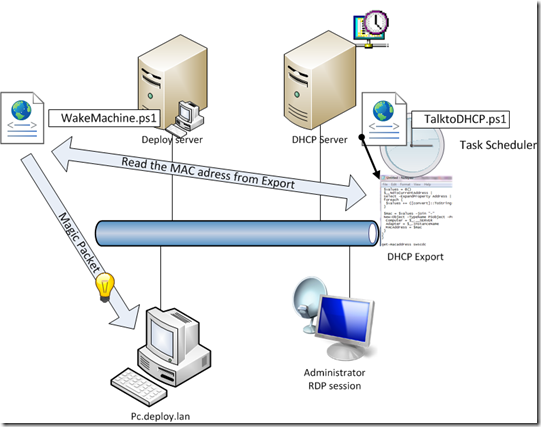
so i found this link to a great
script: i took a part of it shown here:
Function TalkDHCP($server, $scope)
{
#Run netsh for specific DHCP server
$thearg = "dhcp server " + $server + " scope " + $scope + " show clients 1"
$dhcp = ($thearg | netsh)
#Take output, convert MacAddr - to : ... put in hash table
#Modified from "Parsing columnar data" topic on http://powershellcommunity.org forum
$output = $dhcp[8..($dhcp.length-6)] | foreach {
$row = $_.split(" ",[StringSplitOptions]::RemoveEmptyEntries)
$ip = @{name="IP";expression={$row[0].trim()}}
if ($row[-2].trim() -ne "-D-"){
$mac = @{name="MAC";expression={$row[3].substring(1, 17).trim().replace("-",":").toUpper()}}
}else{
$mac = @{name="MAC";expression={$row[4].trim().replace("-",":").toUpper()}}
}
$machine = $row[-1].trim()
$name = @{name="Name";expression={$machine.substring(0,$machine.indexOf("."))}}
"" | select $ip,$mac,$name -ErrorAction SilentlyContinue
}
Write-Host "TALKED TO DHCP"
Return $output | Select Name, Mac
}
talkdhcp 1.2.3.4 1.2.3.0
What this script does is extract Machine Names and MAC addresses from the DHCP server through the use of
netsh
I saved this script on the server on which the DHCP server role is installed and installed it in the local
scheduled task manager to be run every hour. The reason for this is: i am unable to invoke the script through a remote session… the output is written to a file on a share.
Here is the batch file that is fired by the Task Scheduler:
powershell.exe D:\PSSCripts\talktoDHCP.ps1 > D:\PSSCripts\exports\exportDHCP.txt
After the
talktodhcp.ps1 script has run and an export is available on a share on the network. this can be used by another script to fire a WOL ‘magic packet’ for the creation of the magic packet i borrowed parts of the code of
Andrew Morgan and combined with some of my own code to get it working:
function send-wakeonlan{
param(
[string]$mac)
if (!($mac -like "*:*:*:*:*") -or ($mac -like "*-*-*-*-*")){
write-error "mac address not in correct format"
break
}
$string=@($mac.split(":""-") | foreach {$_.insert(0,"0x")})
$target = [byte[]]($string[0], $string[1], $string[2], $string[3], $string[4], $string[5])
$UDPclient = new-Object System.Net.Sockets.UdpClient
$UDPclient.Connect(([System.Net.IPAddress]::Broadcast),4000)
$packet = [byte[]](,0xFF * 102)
6..101 |% { $packet[$_] = $target[($_%6)]}
$UDPclient.Send($packet, $packet.Length) | out-null
}
#Main procedure
Do{
Clear-Host
$ErrorActionPreference= "SilentlyContinue"
$trgMachine = Read-Host("Give the name of the machine to be woken")
$macstr = Get-Content '\\DHCPServer\D$\PSScripts\Exports\exportDHCP.txt' |where{$_ -like "*$trgMachine*"}
$maccnv = $macstr.Substring($macstr.Length – 39, 17)
send-wakeonlan -mac $maccnv
$i = 1
do {($machup = Test-Connection -count 1 $trgMachine) | Out-Null
Write $i; $i++; Start-Sleep -s 1 }
until ($i -eq 30 -or $machup -notlike "")
If($i -lt 30 -and $machup -notlike "" ){Write-Host "Machine $trgMachine has awoken"}
else{Write-Host "Machine $trgMachine still sleeps"}
$another= Read-Host("Another machine ? (y)")
}while($another -eq "y")
that is it, now you can start machines that are sleeping, with the use of MAC addresses fed by DHCP. thank you and till next time!


